Automate your badges on markdown files with all-shields-cli
Tool to help automate your badges of shields.io from .all-shieldsrc
Search for a command to run...
Tool to help automate your badges of shields.io from .all-shieldsrc
No comments yet. Be the first to comment.
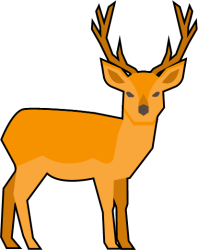
Tool to help automate your badges of shields.io, badgen.net, fury.io and snyk.io from .all-shieldsrc dotfile for your markdown files. You can use Liquid variables like {{name}} or {{version}} which refer to your package.json.
Inspired by all-contributors-cli
Resources: [all-shields-cli on npm] [all-shields-cli on github]

npm install @ptkdev/all-shields-cli --save-devpackage.json add script: ...
"scripts": {
"all-shields-cli": "all-shields-generate"
}
...
.all-shieldsrc and paste sample:{
"files": [
"README.md"
],
"shields": [
{
"id": "my-badges",
"badges": [
{
"url": "https://www.npmjs.com/package/@ptkdev/all-shields-cli",
"color": "lightgray",
"label": "package name",
"title": "package name",
"message": "all-shields-cli",
"style": "flat",
"logo": "",
"platform": "shields"
}
]
}
]
}
Add in your README.md the html comment (my-badges is id from the previous step):
<!-- all-shields/my-badges:START -->
<!-- all-shields/my-badges:END -->
Run npm run all-shields-cli
See folder examples, run with node example.js. Below is available a description of options values.
In your .all-shieldsrc dotfile you can use liquid variables like {{name}} or {{version}} which refer to your package.json. Key of package.json is name of liquid variable {{key_from_package.json}}